


Microsoft 365 Security Best Practices for 2026: The Strategic Architect’s Guide

What if the security protocols you calibrated last year are now the very gateways an AI-driven phishing bot uses to bypass your perimeter? It's a valid concern for any leader who feels overwhelmed by a relentless tide of alerts and the pressure to maintain productivity. You're likely navigating the recent March 6, 2026, POPIA regulations regarding health information, which demand a more precise approach to data sovereignty than ever before. Implementing Microsoft 365 security best practices for 2026 is no longer a one-time configuration. It's a journey toward digital renewal where clarity replaces complexity.
This guide provides a sophisticated roadmap to master the 2026 threat landscape with a multi-layered strategy designed for the modern architect. We'll show you how to reduce the risk of data breaches while maintaining a seamless balance between ironclad security and fluid collaboration. From adopting NIST-standard phishing-resistant MFA to embedding Zero Trust principles into your daily operations, you'll gain the tactical insights needed to transform your M365 environment into a resilient catalyst for growth. We'll explore how to move from a state of uncertainty to one of total readiness, ensuring your organization's digital evolution remains in expert hands.
Key Takeaways
- Recognize why native settings often fall short against AI-enhanced phishing and learn to bridge the "SaaS Security Gap" effectively.
- Transition to phishing-resistant authentication and the Principle of Least Privilege to secure your identity perimeter.
- Master Microsoft 365 security best practices for 2026 by aligning Information Protection tools with the latest POPIA compliance requirements.
- Secure your collaborative ecosystem by hardening Microsoft Teams and auditing third-party app permissions to prevent data exfiltration.
- Discover how strategic IT assistance and cloud backups provide a multi-layered safety net that native trash bins cannot match.
Navigating the 2026 Threat Horizon: Why Native Security is No Longer Enough
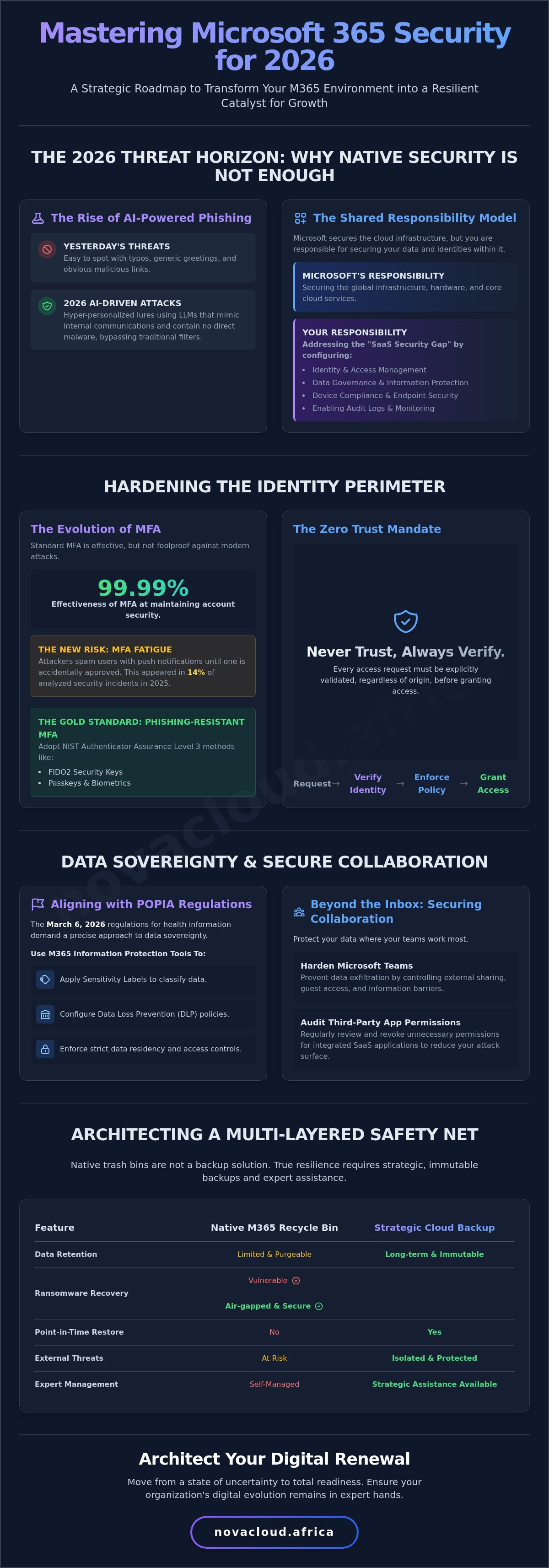
The digital horizon of 2026 is defined by a paradox. As our tools become more intelligent, the threats designed to dismantle them gain equal sophistication. For South African enterprises, the stakes have never been higher. With the March 6, 2026, implementation of new POPIA regulations specifically governing health information, the definition of digital sovereignty has shifted. It's no longer just about where your data resides; it's about the rigor of the architecture defending it. Relying solely on default configurations is a risk that modern strategic architects can't afford. Mastering Microsoft 365 security best practices for 2026 requires moving beyond a "set and forget" mentality toward a state of continuous digital renewal.
The Rise of AI-Powered Social Engineering
Yesterday's phishing attempts were often easy to spot, frequently riddled with typos and generic greetings. Today, attackers leverage advanced Large Language Models to craft hyper-personalized lures that mimic the exact tone and cadence of your internal communications. This evolution has forced a fundamental change in defensive strategy. We've moved from simply detecting bad links to detecting unusual intent. Traditional email filters often struggle with these "clean" messages that contain no malware but carry malicious instructions. This is why a secondary layer of intelligence is essential. It provides the clarity needed to catch sophisticated social engineering that native filters might overlook.
The Shared Responsibility Model in 2026
There's a dangerous assumption that cloud environments are inherently safe because a global giant manages the underlying hardware. While Microsoft provides a robust foundation through tools like Microsoft Defender Antivirus, they don't manage your specific business configurations or user behaviors. This is the core of the Shared Responsibility Model. Microsoft secures the infrastructure, but you're responsible for the identities, data governance, and device compliance within your tenant.
Many organizations operating on default M365 Business Basic setups face significant blind spots. These "SaaS Security Gaps" often include disabled audit logs, overly permissive external sharing, and a lack of conditional access. A visionary architecture treats security as a multi-layered shield rather than a single gate. By adopting Microsoft 365 security best practices for 2026, you ensure your organization's growth is supported by a resilient framework. This approach protects against automated credential stuffing and ensures that your regional progress isn't derailed by global threats. It's about building a system that's as ambitious as your business goals.
Hardening the Identity Perimeter: Phishing-Resistant MFA and Zero Trust
Identity is the new perimeter. In the sophisticated landscape of 2026, standard multi-factor authentication is no longer the final word in defense. While Microsoft research confirms that MFA remains 99.99% effective at maintaining account security, the rise of MFA fatigue attacks, which appeared in 14% of analyzed security incidents in 2025, necessitates a strategic shift. We're moving toward phishing-resistant methods like FIDO2 security keys and passkeys. These technologies represent the gold standard of Authenticator Assurance Level 3, as designated by NIST. Implementing these tools is a core component of Microsoft 365 security best practices for 2026, ensuring that your organization isn't just checking a box, but building a fortress.
The architectural philosophy guiding this shift is Zero Trust. It operates on a simple, powerful mandate: never trust, always verify. Every access request must be explicitly validated, regardless of its origin. This mindset aligns with CISA's Zero Trust Maturity Model, which provides a roadmap for organizations transitioning from reactive security to proactive resilience. For South African enterprises, this means architecting a system where trust is earned and verified at every digital touchpoint. Refining these complex policies often requires a strategic ally, where professional IT assistance can help you design a roadmap that balances strict protocols with seamless user collaboration.
Implementing Conditional Access Policies
Conditional Access acts as the intelligent engine of your identity perimeter. By setting geographic boundaries, you can block login attempts from international regions where your business doesn't operate, immediately neutralizing a vast portion of global threat actors. Furthermore, enforcing device compliance checks ensures that only healthy, managed hardware can touch sensitive company data. When the system detects risk-based signals, such as an "impossible travel" scenario, it can trigger automated blocks or password resets. This creates a responsive environment that adapts to threats in real time.
Privileged Identity Management (PIM)
Standing access is a significant vulnerability. If an administrator account is compromised, the attacker gains permanent, high-level control over your entire tenant. Privileged Identity Management eliminates this risk by ensuring that administrative rights are only active when they're actually needed. By utilizing Just-In-Time (JIT) access, you drastically minimize your attack surface. Just-In-Time access is a security protocol that provides users with temporary elevation of rights only for the specific duration required to complete a task. This rhythmic approach to permissions ensures that your most powerful accounts remain dormant and protected when not in use, reflecting a truly visionary approach to Microsoft 365 security best practices for 2026.
Strategic Data Sovereignty: Aligning M365 with POPIA and Resilience
Digital resilience in South Africa requires more than a global compliance checklist. It demands an architecture that respects local mandates, specifically the Protection of Personal Information Act. As of March 6, 2026, new regulations regarding the processing of health information have tightened the requirements for medical schemes, employers, and insurers. Implementing Microsoft 365 security best practices for 2026 means moving beyond basic encryption to a state where data sovereignty is architected into every workflow. It's about ensuring that your regional growth is anchored by a system that understands the nuances of South African law and protects the dignity of your data subjects.
A visionary approach involves using sensitivity labels to automate data classification. These labels don't just mark a document; they enforce persistent protection that follows the file wherever it travels. By following a prioritized M365 security roadmap, you can ensure that high-stakes information remains encrypted even if it leaves your tenant. This proactive stance transforms security from a barrier into a catalyst for trust, allowing your team to collaborate with confidence while maintaining a clear audit trail of every sensitive interaction.
POPIA Compliance in the Microsoft Ecosystem
Microsoft Purview serves as the command center for managing data subject access requests and ensuring data residency. Within this ecosystem, Data Loss Prevention (DLP) policies act as a silent guardian. They can be configured to detect and block the accidental sharing of South African ID numbers or medical records in real time. Adhering to Microsoft 365 security best practices for 2026 means leveraging these automated tools to ensure your organization remains compliant without constant manual intervention. Because Microsoft 365 now offers local data residency through South African data centers, you can confidently demonstrate where your data lives, fulfilling a core requirement of POPIA without sacrificing the speed of the cloud.
The Necessity of Immutable Offsite Backups
A common misconception among many leaders is that the native Microsoft 365 recycle bin constitutes a disaster recovery plan. In reality, these bins are temporary staging areas, not a resilient defense. By 2026, sophisticated ransomware strains have evolved to specifically target and purge cloud-native backup files within the tenant. True resilience requires Cloud backups that exist outside your primary M365 environment. Integrating Acronis Cloud allows you to implement a robust "3-2-1" backup strategy, ensuring your data is redundant and immutable. This architecture lets you define a precise Recovery Point Objective (RPO), ensuring that mission-critical data can be restored with minimal disruption. It's a fresh start for business efficiency, grounded in the certainty that your digital assets are shielded from total loss.
Beyond the Inbox: Securing Collaboration and Reducing SaaS Risk
Security within the 2026 ecosystem extends far beyond the perimeter of the inbox. As collaboration becomes the heartbeat of the modern enterprise, platforms like Microsoft Teams, SharePoint, and OneDrive have become the primary repositories for institutional knowledge. Without a sophisticated architecture, these tools can inadvertently become conduits for data exfiltration. Adopting Microsoft 365 security best practices for 2026 requires a shift in focus toward the granular control of how data moves within and across these collaborative spaces. It's about empowering your team to share ideas without compromising the integrity of your digital assets.
Hybrid work has dissolved the traditional office boundary, making network-level protection more relevant than ever. Integrating a Managed Firewall into your security stack ensures that traffic is inspected and filtered before it ever reaches your cloud environment. This multi-layered approach provides a stable foundation for your remote workforce, shielding them from malicious traffic while they access mission-critical resources. To ensure your collaboration tools are architected for maximum resilience, consider partnering with a strategic ally by exploring our IT assistance services.
Teams and SharePoint Governance
Effective governance starts with closing the doors to unauthenticated users. Disabling anonymous join for sensitive internal meetings prevents unauthorized participants from eavesdropping on strategic discussions. Additionally, setting strict expiration dates for guest access and shared collaboration links ensures that external permissions don't linger indefinitely. Monitoring for unusual file download volumes in SharePoint acts as an early warning system. If an account suddenly syncs thousands of files, your system should automatically flag the activity as a potential exfiltration attempt, providing the clarity needed to intervene before a breach occurs.
Managing the SaaS Ecosystem
The modern digital architect must also contend with the "Shadow SaaS" phenomenon. High-risk OAuth permissions granted to third-party applications often go unmonitored, creating silent vulnerabilities. While "Sign in with Microsoft" offers convenience, it can lead to unvetted platforms gaining access to your user profiles and data. Shadow IT creates unmonitored backdoors into your tenant by allowing employees to integrate external tools without oversight from the central IT architecture. Auditing these permissions and revoking access for dormant or high-risk apps is a vital step in maintaining Microsoft 365 security best practices for 2026. This practice ensures your environment remains clean, efficient, and fully aligned with your broader security objectives.
Architecting Your Digital Renewal: Optimizing M365 Security with NovaCloud Africa
True security is never found in a generic checklist; it is born from a visionary partnership that understands the local landscape. NovaCloud Africa acts as your strategic ally, ensuring that your Microsoft 365 Business Licensing is not merely a line item, but a foundational pillar for regional growth. We specialize in simplifying the intricate security configurations that often leave South African SMEs vulnerable, turning technical complexity into operational clarity. It's about empowering your organization with the same high-level architecture used by global giants, specifically tailored for the unique requirements of our primary market. By moving from a state of uncertainty to one of readiness, your digital evolution remains in expert hands.
Selecting the Right License for Security
Choosing between Business Standard and Business Premium is the first critical decision for any strategic architect. While Standard provides the essential tools for productivity, Business Premium is the gold standard for 2026 threat protection. It unlocks the advanced layers of defense we've discussed, such as Intune device management and advanced information protection. By optimizing your license selection through NovaCloud Africa, you maximize your security posture without overextending your budget. This ensures every rand spent contributes to a more resilient, compliant enterprise that is ready for the future. We help you navigate these choices with a focus on tangible business outcomes, ensuring your license works as hard as your team does.
The NovaCloud Africa Managed Security Advantage
Effective defense requires continuous vigilance, not just a one-time configuration. Our Strategic IT Assistance provides the proactive threat hunting and incident response support necessary to stay ahead of evolving threats. We bridge the gap between your physical connectivity, like high-speed Business Fibre, and your cloud environment. This holistic integration of voice, connectivity, and security creates a seamless ecosystem where your digital evolution is in expert hands.
Implementing Microsoft 365 security best practices for 2026 is an opportunity for a fresh start in business efficiency and a moment of renewal. This progression moves your organization toward a state of clarity, allowing you to focus on regional progress while we manage the technical execution. Partner with NovaCloud Africa for a secure digital evolution and let's design a system that empowers your primary regional goals. Our commitment to your mission ensures that your infrastructure is built for both stability and ambitious expansion.
Design Your Resilient Digital Future
The complexity of the 2026 landscape doesn't have to be a barrier to your progress. It's an invitation to architect a more resilient, purposeful system that supports your long term goals. We've explored how moving beyond native settings to embrace Zero Trust and phishing resistant authentication creates a formidable identity perimeter. By aligning your tenant with localized POPIA requirements and securing your collaborative channels, you transform security into a catalyst for trust and regional empowerment. Integrating Microsoft 365 security best practices for 2026 ensures your organization is ready for every challenge the digital horizon presents.
NovaCloud stands as your strategic ally in this evolution. As an authorized Microsoft 365 Business Licensing partner, we offer expert national IT assistance and a managed security infrastructure featuring FortiNet and Acronis. We're here to ensure your digital renewal is handled with quiet confidence and technical precision. Architect your secure Microsoft 365 environment with NovaCloud Africa and step into a future of clarity and unhindered growth. Your most secure chapter starts today.
Frequently Asked Questions
What are the most critical Microsoft 365 security settings for South African businesses in 2026?
The most critical settings include Conditional Access policies that enforce geographic boundaries and device compliance. For South African enterprises, ensuring data residency within local regions is paramount to maintain operational stability. Implementing Microsoft 365 security best practices for 2026 requires disabling legacy authentication and enforcing phishing resistant MFA across all accounts. These configurations provide a stable foundation for your digital evolution, shielding your organization from global threat actors while maintaining local regulatory alignment.
How does Microsoft 365 help with POPIA compliance?
Microsoft 365 facilitates POPIA compliance through Microsoft Purview and built in Data Loss Prevention (DLP) tools. These features allow you to identify, classify, and protect sensitive information like South African ID numbers or health records automatically. Because Microsoft now hosts data in local South African data centers, organizations can meet data sovereignty requirements more easily. It's a sophisticated approach that ensures your digital growth remains anchored by legal rigor and ethical data handling.
Is multi-factor authentication (MFA) enough to stop modern phishing attacks?
Standard MFA is no longer a complete defense against the sophisticated AI driven phishing attacks of 2026. While traditional methods are effective, attackers now use MFA fatigue and session hijacking to bypass them. Transitioning to phishing resistant authentication, such as FIDO2 security keys or passkeys, is essential. This shift is a core part of Microsoft 365 security best practices for 2026, moving your organization toward a Zero Trust model where identity is verified with absolute clarity.
What is the difference between Microsoft 365 native backup and third-party cloud backups?
Native M365 tools primarily offer short term retention through the recycle bin, which isn't a substitute for a true disaster recovery plan. Third party solutions like Acronis Cloud provide immutable, offsite backups that are disconnected from your main tenant. This redundancy is vital because modern ransomware often targets cloud native backups first. Using an external backup ensures you can restore mission critical data quickly, providing a fresh start if your primary environment is ever compromised.
How can I prevent employees from installing "Shadow IT" apps through their M365 accounts?
You can prevent Shadow IT by configuring app consent policies within the Microsoft Entra admin center. These policies allow you to restrict which third party applications employees can grant permissions to using their work accounts. By requiring admin approval for new integrations, you eliminate unmonitored backdoors and maintain control over your SaaS ecosystem. This proactive governance ensures that your organization's digital architecture remains clean, efficient, and free from unvetted external risks.
Which Microsoft 365 license offers the best security for the price?
Microsoft 365 Business Premium offers the most comprehensive security value for your investment. It includes advanced features like Intune for device management and Azure Information Protection that are absent in Business Standard. For organizations navigating the 2026 threat landscape, Business Premium acts as the gold standard, providing the tools needed for a Zero Trust architecture. It allows SMEs to optimize their security posture without the higher costs associated with full enterprise licensing.
How do I monitor for unauthorized access in my Microsoft 365 tenant?
Monitoring involves reviewing Entra ID sign in logs and setting up automated alerts for suspicious activities like "impossible travel" or multiple failed login attempts. Microsoft Defender for Office 365 provides a centralized dashboard to track unusual file downloads or external sharing patterns. Continuous monitoring transforms your security from a reactive barrier into a visionary shield. It ensures that any unauthorized access is identified with technical precision, allowing for immediate incident response.
Can a managed firewall improve my Microsoft 365 security?
A managed firewall significantly improves security by inspecting and filtering network traffic before it reaches your cloud environment. For hybrid workforces, a firewall like FortiNet provides a secure tunnel for remote users, ensuring that their connection to Microsoft 365 is protected from local network threats. This multi-layered approach bridges the gap between your physical connectivity and cloud services. It creates a stable ecosystem where your business fibre and cloud security work in perfect harmony.
