


Migrating from On-Premise Exchange to M365: The 2026 Strategic Architect’s Guide

By April 2026, the extended security lifeline for legacy Exchange servers finally expired, leaving organizations with a stark choice: remain anchored to aging hardware or ascend to a more resilient digital horizon. You likely feel the weight of maintaining physical servers and the constant pressure of securing outdated infrastructure against modern threats. If you're currently migrating from on-premise exchange to M365, you aren't just moving mailboxes; you're renewing your organization's entire operational architecture.
We understand that the complexity of managing hybrid identities and ensuring POPIA compliance can feel overwhelming. This guide offers a comprehensive blueprint to transition your enterprise from the shadow of legacy maintenance into the light of a high-performance Microsoft 365 ecosystem. You'll learn how to eliminate onsite hardware overhead and unlock the full potential of collaborative tools like Microsoft Copilot and Teams. We will navigate the technical nuances of this evolution together, ensuring your transition is seamless, secure, and strategically sound.
Key Takeaways
- Identify why 2026 marks a definitive shift for legacy systems and how to mitigate the escalating risks of aging on-site hardware.
- Discover the optimal technical framework for migrating from on-premise exchange to M365, whether your architecture requires a clean cutover or a phased hybrid approach.
- Implement a rigorous architectural audit to ensure Active Directory health and connectivity stability before initiating your data transfer.
- Secure your digital borders by mastering POPIA compliance and understanding the nuances of data residency within the South African context.
- Maximize your long-term ROI by evolving your environment from a simple email tool into a fully integrated ecosystem of cloud-native collaboration.
The Strategic Imperative: Why Move from On-Premise Exchange to Microsoft 365?
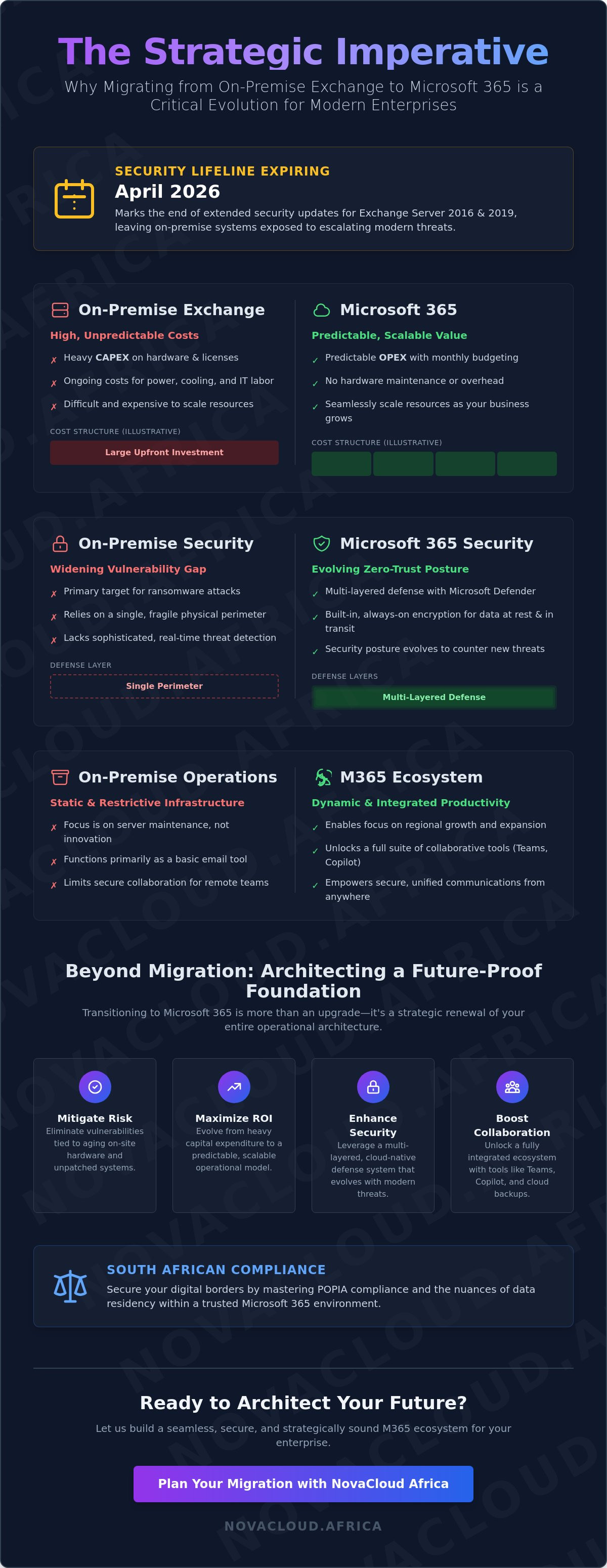
The sunset of legacy hardware isn't just a technical deadline; it's a strategic crossroads for the modern enterprise. As of April 14, 2026, the final extended security updates for Exchange Server 2016 and 2019 have officially concluded. This marks the end of a long era of localized server management. For many organizations, the risk of maintaining these isolated islands of data has become untenable. Migrating from on-premise exchange to M365 represents a fundamental shift from static, fragile infrastructure to a dynamic, cloud-native ecosystem that empowers growth. This transition brings a sense of renewal, allowing South African enterprises to shed legacy debt and focus on regional expansion rather than server room maintenance. By adopting Microsoft 365, your organization gains more than just a mailbox. It secures a foundation for unified communications and robust cloud backups that are vital in a high-speed digital economy.
The Cost of Stagnation vs. The Value of Agility
Calculating the true cost of ownership for on-premise servers reveals hidden drains on your capital. Beyond the initial hardware purchase, you're paying for specialized IT labor, constant cooling, and significant power consumption to keep physical machines running. These costs are often unpredictable and difficult to scale as your business grows. Transitioning to the cloud shifts your financial model from heavy CAPEX to a predictable OPEX structure. This allows for precise resource allocation and manageable monthly budgeting. Architectural renewal is the process of replacing restrictive legacy systems with scalable cloud frameworks. It's a purposeful design choice that ensures your technology supports your vision instead of limiting it.
Security in the Age of Modern Threats
The vulnerability gap for on-premise servers has never been wider. Legacy versions of Exchange are primary targets for ransomware because they often lack the sophisticated, real-time threat detection found in modern cloud environments. When you complete the process of migrating from on-premise exchange to M365, you leverage Microsoft Defender and built-in encryption to establish a zero-trust security posture. Your data is no longer protected by a single physical perimeter but by a multi-layered defense system that evolves as quickly as the threats do. Integrating Managed Firewall strategies into this new environment ensures that your network remains resilient. This holistic approach protects your assets while giving your team the freedom to collaborate securely from any location, whether they're in the office or working remotely across the province.
Ultimately, this migration is about more than just email delivery. It's about positioning your organization to utilize advanced tools like Hosted PBX and integrated VoIP systems. These services transform your communication from a simple utility into a strategic advantage, fostering a culture of clarity and efficiency that legacy hardware simply cannot match.
Evaluating Migration Path Frameworks: Cutover, Staged, and Hybrid
Choosing the right framework for migrating from on-premise exchange to M365 is the first major architectural decision in your journey. It defines the tempo of your transformation and sets the tone for your organization's digital renewal. While every enterprise seeks efficiency, the path you select depends on your existing infrastructure, your tolerance for downtime, and your long-term operational goals. By analyzing Microsoft's migration methods, we can categorize the transition into three primary strategic models that balance technical stability with business continuity.
The Cutover Path: Speed and Simplicity
The Cutover methodology is designed for organizations seeking a clean break from legacy hardware. It's the most effective route for small to medium enterprises with fewer than 2,000 mailboxes that are already running modern versions of Exchange. This 'flip the switch' moment typically occurs over a single weekend, where all mailboxes, contacts, and calendar items are moved simultaneously. While it offers the fastest path to a cloud-native state, it requires meticulous preparation. You must verify domain ownership and ensure your SSL certificates are fully compliant well before the synchronization begins. Managing user expectations is equally vital; since everyone moves at once, clear communication about the new login process ensures a smooth start on Monday morning.
Hybrid Frameworks: The Architect’s Choice for Complexity
For larger enterprises or those with complex compliance requirements, a Hybrid Architecture is the sophisticated choice. It creates a seamless bridge between your current environment and the cloud, allowing them to function as a single integrated system. The Hybrid Configuration Wizard (HCW) facilitates this coexistence, enabling features like shared free/busy calendar data and a unified Global Address List across both platforms. This is a strategic advantage for organizations currently utilizing Virtual Private Servers to host specialized legacy applications. It allows you to move mailboxes in batches at your own pace, providing a safety net for mission-critical data while your team adapts to the new ecosystem.
Staged migrations serve as a necessary alternative for those still operating on legacy Exchange 2003 or 2007 versions. Regardless of the methodology, your success hinges on a rigorous assessment of your current environment. Before committing to a path, consider this essential checklist:
- System Health: Audit your current Exchange patch levels and Active Directory integrity.
- Data Volume: Calculate the total number of mailboxes and the size of your archives to estimate synchronization time.
- Connectivity: Ensure your network bandwidth can handle the heavy data lift without impacting daily operations.
- Identity Management: Plan for how user identities will be synchronized between your local directory and the cloud.
Selecting the right framework is about more than just moving data; it's about designing a system that empowers your future. If you're looking for guidance on which path best aligns with your regional growth strategy, our team offers specialized IT Assistance to help you architect a flawless transition.
The Architectural Blueprint: Executing a Seamless M365 Migration
Executing a successful transition requires more than just technical knowledge; it demands a disciplined, phased approach that respects the integrity of your data. While we've previously explored the strategic reasons for this shift, this blueprint focuses on the precise execution steps needed to ensure zero data loss and minimal disruption. By following Microsoft's official migration paths, your organization can move through five distinct stages of architectural renewal, transforming a complex technical hurdle into a streamlined evolution.
Preparing the Foundation: Audit and Cleanup
The "garbage in, garbage out" principle is never more evident than when migrating from on-premise exchange to M365. Moving bloated mailboxes, redundant data, or legacy aliases only complicates your new cloud environment and extends synchronization times. Before the first byte of data moves, you must conduct a rigorous environmental audit. This involves purging inactive accounts and ensuring that your User Principal Names (UPN) align perfectly with your M365 requirements for a seamless login experience. A healthy Active Directory is the cornerstone of a successful identity migration. Without this underlying health, your team may face authentication hurdles that stall productivity the moment they attempt to access their new cloud mailboxes.
Managing the Data Flow: Bandwidth and Syncing
Synchronizing terabytes of enterprise data requires a realistic assessment of your network's capacity. You should calculate your migration windows by analyzing your total mailbox volume against your available upload speeds. Utilizing high-performance Business Fibre is essential during this phase, as symmetrical speeds ensure that data moves into the cloud as quickly as it's processed on-site. By organizing users into specific migration batches, you can manage throughput effectively and avoid network congestion during critical business hours. This rhythmic approach to data transfer allows for steady progress without compromising the daily operations of your regional offices.
Once the foundation is secure, the Pilot Migration begins. This involves moving a small, non-critical group of users to test the blueprint in a live scenario. It's a vital moment to identify any unforeseen friction before the Bulk Transition occurs. During the main batch execution, precision monitoring allows you to track progress in real-time and address individual sync issues immediately. The final stage is the Cutover, where you update your MX records to redirect the flow of communication to the cloud. This final pivot marks the moment your organization officially leaves the constraints of legacy hardware behind, stepping into a future defined by cloud-native agility and renewed operational clarity.
Navigating Regional Challenges: Compliance, POPIA, and Data Sovereignty
Success in migrating from on-premise exchange to M365 within the South African market requires more than technical precision; it demands a deep alignment with local regulatory landscapes. While the global shift toward cloud-native systems offers immense agility, regional enterprises must navigate the specificities of the Protection of Personal Information Act (POPIA). This legislation isn't a hurdle but a framework for digital integrity. By architecting your tenant with compliance at the core, you ensure that your organization's renewal is built on a foundation of trust and legal resilience.
Compliance by Design: POPIA and M365
Configuring your environment to protect the personal information of South African citizens is a non-negotiable step. Data Loss Prevention (DLP) policies allow you to automatically identify and secure sensitive records, such as ID numbers or financial details, before they leave your digital perimeter. Your Information Officer plays a pivotal role here, managing privacy settings to ensure they align with both internal governance and national mandates. To strengthen this posture, integrating Cloud backups provides a secondary layer of POPIA-compliant redundancy. This ensures that even in the event of a primary system failure, your data remains accessible and protected under local standards.
Understanding data residency is equally vital. Microsoft's local data centers in Johannesburg and Cape Town facilitate compliance by keeping primary data within our borders. However, you must also implement Litigation Hold and eDiscovery features to maintain legal readiness post-migration. These tools allow your legal team to preserve and search data efficiently, ensuring that your transition to the cloud doesn't compromise your ability to meet discovery obligations during litigation or regulatory audits.
Resilient Connectivity for the National Enterprise
The "connectivity gap" remains a reality for many regional businesses, where subsea cable breaks or local infrastructure outages can threaten cloud access. Maintaining productivity requires a strategy that bridges the physical and the digital. By leveraging offline caching in Outlook, your team can continue working during intermittent outages, with changes syncing automatically once the connection is restored. True resilience, however, comes from integrating redundant links and high-speed infrastructure to secure the celestial clarity of 24/7 access. When you are migrating from on-premise exchange to M365, planning for these local contingencies ensures that your digital evolution isn't stalled by physical limitations.
Navigating these regional complexities is a journey best taken with a partner who understands the local landscape. If you're ready to secure your organization's future with a compliant and resilient architecture, explore our range of IT Assistance services tailored for the South African enterprise.
Beyond the Migration: Architecting the Future of Productivity
Completing the technical process of migrating from on-premise exchange to M365 is not a finish line; it's a new baseline for enterprise agility. While the initial goal is often the elimination of legacy server debt, the true value lies in how you architect the ecosystem that follows. Transitioning to the cloud is a catalyst for cultural renewal, where email becomes just one facet of a broader, unified collaboration strategy. To realize the full potential of this shift, organizations must move beyond the mailbox and activate the full spectrum of tools available within the Microsoft environment.
Maximizing your return on investment starts with a precise approach to Microsoft 365 Business Licensing. With the verified price increases effective July 1, 2026, where Business Standard rises to $14.00 and E3 to $39.00 per user, strategic seat management is more critical than ever. It's about ensuring every user has the exact features they need without over-provisioning. Once your licensing is optimized, the focus shifts to activating the ecosystem. Moving your data into Teams, SharePoint, and OneDrive transforms static files into dynamic assets, allowing for real-time co-authoring and secure, borderless access. This technological leap must be matched by a human-centric approach; training your workforce to embrace these tools is essential to turn digital potential into tangible productivity.
Unified Communications and Modern Voice
The modern workforce requires mobility that legacy desk phones simply cannot provide. Integrating Hosted PBX systems with your M365 environment creates a single pane of glass for all business interactions. This shift from physical hardware to versatile softphones allows your team to maintain a professional presence from any location, whether they're using a laptop or a mobile device. This unified communications architecture ensures that voice, video, and chat are no longer siloed applications but a cohesive experience that fosters clarity and energetic collaboration across your regional offices.
Continuous Evolution: The NovaCloud Africa Partnership
Migration is the starting point of a continuous digital evolution. The cloud landscape is never static, with new AI-driven features like Microsoft Copilot and security updates through Microsoft Purview arriving regularly. As your strategic ally, NovaCloud Africa provides the ongoing IT Assistance needed to navigate these changes. We help you manage licensing audits, oversee security posture refinements, and ensure your infrastructure scales alongside your ambitions. Our role is to be the forward-thinking designer of your systems, allowing you to focus on growth while we handle the technical execution. Ready for a fresh start? Partner with NovaCloud Africa for a seamless M365 migration and illuminate the path to a more efficient, cloud-native future.
Illuminating Your Path to Cloud-Native Excellence
The transition from legacy server maintenance to a high-performance ecosystem is finally complete. You've navigated the complexities of architectural renewal, secured your data under POPIA standards, and positioned your enterprise for a future of unified collaboration. This evolution is more than a technical shift; it's a strategic commitment to regional growth and operational clarity that leaves the constraints of physical hardware behind.
When you begin migrating from on-premise exchange to M365, having a partner who understands the local landscape is essential. NovaCloud Africa stands as your authorized Microsoft 365 Business Licensing partner, providing end-to-end managed migration services backed by South African based technical support and ICT infrastructure. We ensure that your digital architecture remains resilient and forward-looking, allowing you to focus on your core mission while we manage the technical execution.
We're ready to help you design a system that empowers your vision. Architect your migration with NovaCloud Africa's M365 experts and step into the light of a new digital era.
Frequently Asked Questions
How long does a typical migration from on-premise Exchange to M365 take?
A typical migration timeline varies based on your chosen method and total data volume. A cutover migration for a small enterprise can often be completed over a single weekend. In contrast, a complex hybrid migration for a large organization might span several weeks as mailboxes move in controlled batches. Factors like network health and Active Directory integrity significantly influence the overall duration of your digital renewal.
Will my users experience downtime during the email migration process?
Your users should experience minimal to no downtime during a professionally managed transition. While a cutover migration requires a brief pause during the MX record update, a hybrid architecture allows for a seamless experience where users continue working without interruption. By carefully planning migration batches and testing connectivity beforehand, we ensure that the flow of communication remains steady throughout the entire evolution.
Is Microsoft 365 compliant with South Africa's POPIA regulations?
Microsoft 365 is fully capable of supporting POPIA compliance for South African organizations. Microsoft operates local data centers in Johannesburg and Cape Town, ensuring that your primary data residency remains within national borders. However, compliance also depends on your internal configuration. Implementing Data Loss Prevention policies and assigning a dedicated Information Officer are essential steps to meeting the legal requirements of the Act.
What happens to my existing archives and public folders during migration?
Your existing archives and public folders are integral parts of the architectural blueprint. Most modern migration tools move these items directly to Exchange Online or specialized M365 archive mailboxes. For exceptionally large or complex legacy structures, we utilize specialized utilities to ensure every piece of historical data is preserved. This process ensures that your organizational memory remains intact as you transition to a cloud-native environment.
Do I need to upgrade my office internet before starting a cloud migration?
While an upgrade isn't always mandatory, high-performance connectivity is a catalyst for success. Symmetrical Business Fibre ensures that the heavy data lift required when migrating from on-premise exchange to M365 happens efficiently. If your current bandwidth is limited, you might face extended synchronization windows. We recommend an audit of your upload speeds to ensure they can handle the initial data synchronization without impacting daily operations.
Can I keep some users on my local server while others move to the cloud?
You can certainly maintain a split environment by utilizing a hybrid architecture. This sophisticated framework allows some users to remain on your local server while others move to the cloud, functioning as a single unified system. This is an ideal strategy for enterprises with specific compliance needs or those requiring long-term coexistence for specialized applications. It provides the flexibility to evolve your infrastructure at your own pace.
What is the difference between a cutover and a hybrid migration?
The primary difference lies in the speed and depth of integration. A cutover migration moves all mailboxes simultaneously and is best for smaller organizations seeking an immediate transition. A hybrid migration creates a persistent bridge between your on-premise environment and the cloud. This allows for shared calendars, unified address lists, and the ability to move mailboxes in stages, making it the preferred choice for complex enterprise architectures.
How much does a Microsoft 365 business license cost for an enterprise?
Enterprise licensing costs are structured based on the specific security and compliance features your organization requires. Following the global price adjustments in July 2026, tiers such as Business Standard, E3, and E5 offer varying levels of cloud-native functionality. When migrating from on-premise exchange to M365, we recommend an architectural audit to determine which license provides the best ROI for your specific seat count and technical needs.
